
Kate Wieczorek
8th and 9th Grade Math
The past 14 months have been transformative for my approach to blended learning.
Nevada Middle School had developed a Self Paced math program 6 years ago so I was
somewhat familiar with Canvas and online learning. However, when the pandemic hit and
we were forced into “crisis remote teaching” many educators including myself had to push
ourselves to step up our technology game.
I firmly believe in the philosophy of students being able to work asynchronously and
self pace through their learning. The research shows blended learning has many benefits
both for students and teachers. I felt very fortunate to have had this experience under
my belt since the concept of what teachers were being required to do during the pandemic
was very familiar to me. However I quickly realized how far I still needed to go! For this
year’s Individual Career Development Plan goal I stepped outside of my comfort zone even
more and went even deeper into all of the possibilities online learning has to offer.
Most teachers at the middle school and high school levels were asked to make sure their
lessons and materials were available on Canvas should a student have to be out of school
for a prolonged period of time for either illness or to quarantine. However, the middle school
math teachers were asked to go a step further and were responsible for teaching the students
who chose to be online learners this year. (I was also asked and agreed to do the same for
my high school Algebra course.) This meant my 8th grade self paced curriculum needed to
be expanded to meet the current challenges our students and families were facing in our
school community and my Algebra course needed to be designed from scratch!
In the past, the self paced Canvas courses have been used in the classroom to allow
students to self pace through the non essential standards in each course while the essential
standards were taught through mini lessons and collaborative learning tasks. This year
however, our self-paced program needed to provide the most inclusive, flexible, and
responsive learning environment possible to meet all our students' needs. We needed to
provide support for students who were in-person during the school day, for students who
were at home for an extended period, or who were home for the full duration of the
school year. At all times, students needed to have access to the online self-paced instructional
modules. These modules now also needed to cover the essential standards and contain
collaborative learning tasks and assessments that would normally have been done in
paper/pencil format in the brick and mortar setting.
My ICDP goal this year was to continue with the distance learning curriculum provided by our
Technology Department so I could improve my “online teaching practices”. I wanted to
enhance what I was currently doing in the following ways:I had a very limited knowledge base of the features Canvas offers and I wanted to dive deeper
into these options to streamline my content and student feedback.I wanted to create my own instructional videos and upload them into my courses. This is a
change since the previous instructional videos were ones I found on the internet. The research
shows students much prefer the instruction come from their teacher.
I had already added practice assignments by linking Khan Academy, Buzz Math, or worksheets
in each module. The research shows the more variety offered the more engaged students
will be with the material. I wanted to take my assignments one step further and try other
platforms like DESMOS, Kahoot, Quizizz, Quizlet, etc. to add more variety while keeping
the practice paperless.
The implementation of my ICDP actually began on the first day of school. My entire course
for the year was based out of Canvas due to the uncertainty of the pandemic. As
explained above, I needed all materials, resources, and assessments to be located in Canvas
so any student who was unable to be in class would have the same experience as those
who were able to attend school. Any student who had to be in quarantine or who chose to
work from home this year received the same instruction as those who attended in person.
I felt this consistency was extremely important for equity and ease for all of my students
and I am glad I was able to provide some continuity for our students.
My course began with tutorial videos that explained the set up of our modules, how instruction
would be presented, expectations for work submission, and what our assessment and
reassessment policies would be. I was learning right along with the students all the options
Canvas offered for submitting work, embedding material, and providing feedback.

I polled the students to see how they wanted the modules to be set up: by topic/unit or by
the week. Overwhelming the students chose by week. They preferred this method since
they could plan their week out on Mondays and would know exactly what was supposed
to be finished by Friday. In keeping with the Self Paced Math Initiative the district began
six years ago, I did my best to publish modules that were at a minimum of two weeks ahead
of my fastest workers.
Each weekly module followed a similar pattern for consistency and predictability for the
students. The module began with an Engage and eXplore component of a Discussion Board
with a weekly “Good Things” topic in alignment with our Capturing Kids Hearts Program.
Using discussion boards in Canvas was a new feature to me.

This tool worked very well in helping my online learners feel connected to their classmates.
I asked students to both post an answer and reply to two or three classmates’ posts. It was a
great way to build community. I polled the students to see what topics they would like to have
included as Good Things and used their suggestions throughout the course.
Next in the module was the Communicate portion of the EXCEL model used in Capturing Kids
hearts. For communicating new instruction I focused on the district wide learner outcome goal
for our students of Individualized Learners. I have been studying individualized learning the
past few years and I continue to integrate this philosophy into my practice. I wanted to offer
students a variety of ways to interact with the instruction and to demonstrate new learning. For
each new standard, students had a choice between the following: Watch an instructional video I created using my at home “classroom” that involved me at a
white board delivering instruction and presenting examples as I would in a traditional classroom.
This allowed the students to both watch and listen to new instruction in a format they could
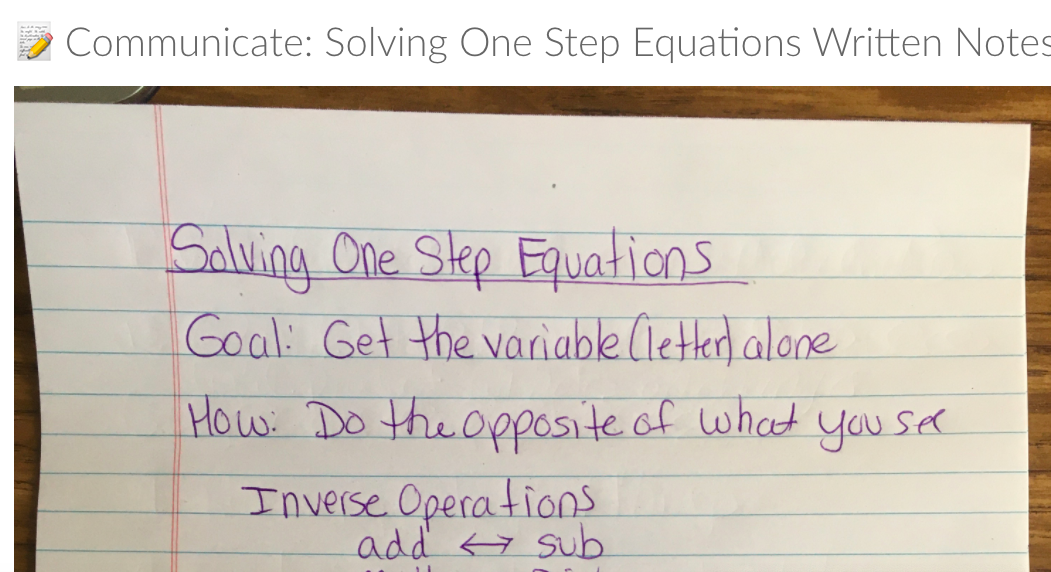
pause or rewind if needed to help them learn at their own pace. Read through detailed written notes that presented the instruction with key points and examples
and solutions. This allowed the students to save some time if the topic was something they
felt they were already familiar with but just needed a refresher in. It also was a good tool for
students who had a hard time focusing while watching videos but had strong reading skills.
They could still work though the material at their own pace. Jump into some “examples to try” on their own. Some students prefer to learn through discovery
rather than direct instruction. Problems were presented to them to try and then a video followed
that worked through each example so they could check their work and be sure they understood
the concept.


I conducted surveys to determine what percentage of my student population was utilizing
the various forms of learning. I found it interesting how the numbers shifted depending on
the time of school year and topics being taught. The students started out strong and they
self reported high percentages of using the videos only or the videos and notes. At the end
of the first quarter I was noticing more students seemed to be struggling on the assessments.
I did another survey and found a portion of students were starting to skip the videos. I
conferenced with each class and reminded them that the video is where the teaching happens!
Only reading the notes might not be enough for students to learn a brand new topic. As students
returned to watching the videos they began to catch up to teacher pace.


I tried a variety of video formats. I used Quicktime to record myself at a white board,
Screencastify to record my screen but still allow the students to see me in the corner,
and Sphere2 with Avermedia to use my document camera to only record the notes or
problems being presented. Surveys showed the students had no real preference for type
of video. They did however state they were glad the videos were made by me rather than
being videos pulled from the internet as we used in self paced math previously.

The middle portion of each module was the Empower portion of independent practice. Again,
I pulled from a variety of resources to give the students voice and choice in how they interacted
with the material. Students were encouraged to complete all practice posted in the module. If
they really felt they did not need as much practice they were able to “skip” some assignments.
However, if they needed to reassess on that standard, they were required to go back and
complete any practice they had skipped. My goal was to expand the types of practice
offered so I added activities in Kahoot, Quizzizz, and Desmos. The various platforms used for
practice were:Traditional worksheets that the students could either print or do on their own paper. Many chose
this option as a “break from their screen”. Once the assignment was submitted the next step
would show them an answer key so they could check their work. Khan Academy and BuzzMath were used for virtual practice options which provided immediate
feedback for students. Kahoot and Quizzizz were integrated to provide a more “competitive” form of practice that also
allowed students immediate feedback.DESMOS activities were provided as a challenge or extension for students who wanted to
interact with the material at a deeper level.

I really liked the Desmos activities. I had attended the ICTM conference two years ago and
went to some workshops presented by Desmos authors. These activities are interactive,
allow students to see each other’s work and have virtual discussions about the slides, and
challenge the students to explore and construct their own knowledge on the topic which aligns
with our AIW goals.


I again surveyed students to obtain feedback on the various activities and it was determined
that the students really liked the variety being offered and they wanted to continue to have
different opportunities for working with the material.

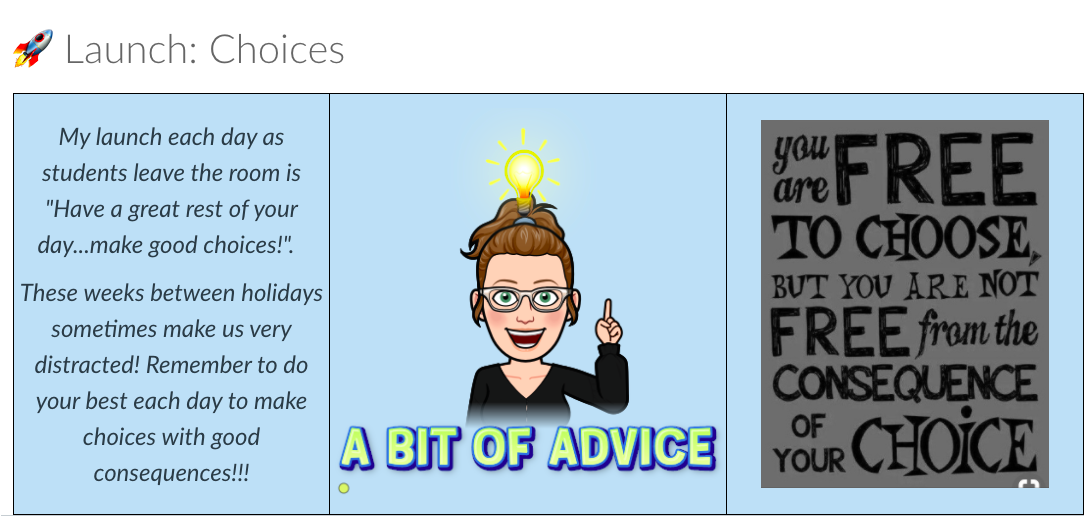
Each module ended with an assessment on the standard and then a Launch for the week.
The assessments were one area that I did not get to try new things yet but I plan on continuing
this work next year. I used a “quote of the week” for the launch each week. I also included
some Google Forms for either mental health check ins or to obtain feedback on the course.

It is interesting to look back and see how the quality of the modules have improved and the
progression I have made in filming and presenting new material to students. The feedback
from the students has been very helpful as I designed the course and was overall very positive.
I am already brainstorming ways to improve based on feedback from the students. Some asked
for “more videos” so I might include some Youtube videos that are not “me” to add variety or
supplemental instruction. Some asked for “more paper” so I have started to offer skeleton
notes they can print and use while watching my videos to help them stay focused.


(Side note: My videos always start with some music to liven things up while they copy down
the beginning information….but apparently my choice of music is “cringey”. So I created a
“Good Things” and asked what their favorite song is. I then started using those (that were
appropriate!) in the videos. They have enjoyed waiting to see if I picked their song.)

Overall, I am very pleased with the progress I made towards meeting my goal. Being able to
have my own videos integrated into self paced math has been a goal of mine since the beginning
so I am very pleased that I was able to do that this year. I feel even more confident in teaching
in a flipped or blended learning classroom now that I have personally designed the course and
understand how to use all the features Canvas offers. This process has also reaffirmed my
belief that giving students ownership over their learning is so important to their success. I plan
to continue to make modifications and integrate new activities so that I can continue to teach in
this style next year.
The following video is a quick presentation that expands even more on what I have learned
through completing my goal this year.
Please feel free to reach out anytime at kwieczorek@nevadacubs.org if you have questions,
would like more information, or would be willing to share ideas that I can try!
Thanks!


